Modeling Subprocesses
Model call activities and subprocesses.
Linking a Task with a Subprocess
The task does not have a type yet or has the call activity type.
There is no specific special element for subprocesses. A process is conceptual to a subprocess, it is called by another process' call activity. This means you can model a subprocess by modeling a process and then defining this as a call activity's called element.
If you look at things from a BPMN perspective, the only condition is that the subprocess must have at least one empty start event (i.e. without an assigned event definition).
- Select the process you want to call as a subprocess.
- Drag the process and drop it on the task.
The task is transformed into a call activity if it is still untyped. The process is defined as the called element for the task. The task is shown in the diagram with a thick border and plus sign. The called process' name is also shown with the activity's name. (This behavior can be changed in the model configuration.)
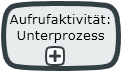
Alternatively, you can change the task into a call activity using the Property task type and define the subprocess in the Called Element property.
Changing Assignment Between Call Activity and Subprocess
- Drag another process and drop it on the call activity.
The process is assigned to the call activity.
Another way to proceed using the Properties window:
- Select the call activity.
- Click on the Select Element button in the Properties window for the Called Element property.
This opens the selection dialog.
-
Select the subprocess you want and confirm with [OK].
The selected process is assigned to the call activity.
 Related Topics